
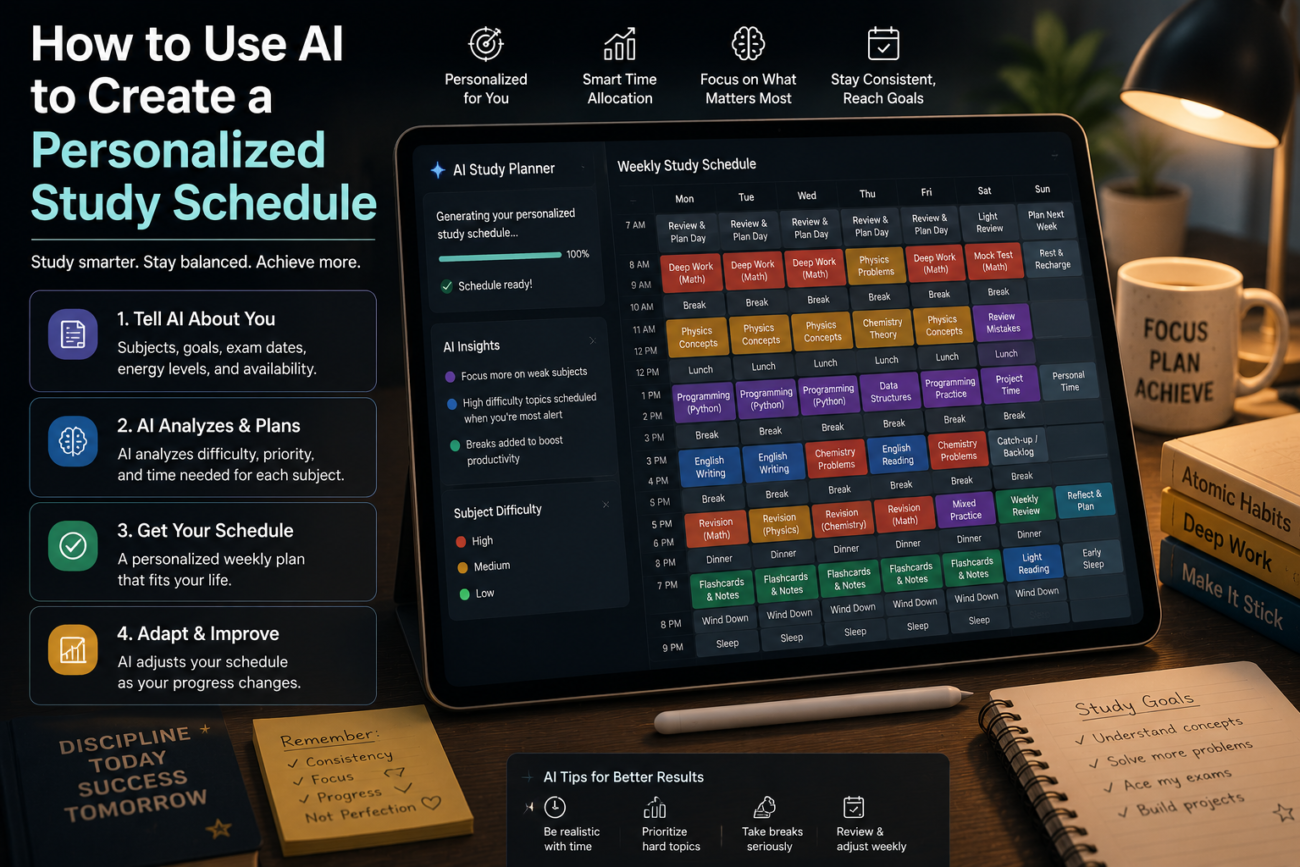
Generic study schedules fail for one reason: they don’t know your life. They don’t know which subjects take you twice as long as others, when your energy is highest, or that you work Thursdays and play sports on Saturdays. Learning to use AI to create a personalised study schedule that actually fits your real constraints — and adapts when they change — is one of the most practically useful applications of AI tools for students. Here’s the complete process, with the exact prompts that make it work.
Why Generic Study Schedules Don’t Work — and What AI Does Differently
A study schedule from a productivity blog assumes a student with a fixed number of free hours, equal difficulty across subjects, and no competing commitments. That student doesn’t exist. What actually works is a schedule built around your specific subjects, your specific deadlines, your specific energy patterns, and your real weekly commitments — one that can be rebuilt in minutes when your workload changes.
This is exactly what AI is good at. Give ChatGPT or Claude your real constraints, and it produces a realistic, specific schedule in minutes — something that would take most students an hour to work out manually, and which they’d avoid revising when things change because the process is too painful.
Step 1: Gather Your Inputs Before Opening the AI
The quality of your schedule depends entirely on the quality of the information you give the AI. Before writing a single prompt, note down:
- Your subjects and roughly how difficult or time-intensive each feels relative to the others
- All upcoming deadlines and exams — dates, weightings, and how much preparation each needs
- Your fixed commitments — work shifts, sports, family obligations, classes you can’t move
- Your preferred study hours — when you’re genuinely most alert (morning, afternoon, evening)
- Your current study habits — how long you can concentrate before needing a break, whether you prefer long blocks or shorter sessions
- The date range you need the schedule for — one week, one month, or up to an exam
Two minutes gathering this makes the difference between a schedule that fits your life and a generic one that doesn’t.

Step 2: The Master Schedule Prompt
With your inputs ready, use this prompt — fill in the bracketed sections with your real information:
“I need help creating a personalised study schedule. Here are my details:
Subjects: [list each subject and rate its difficulty for you: easy/medium/hard]
Upcoming deadlines: [subject — deadline date — type of assessment — estimated preparation needed]
Fixed commitments this week: [list days/times you’re unavailable]
Best study hours: [e.g., ‘I focus best from 8–11 am and 7–9 pm. I’m useless after 10 pm.’]
Concentration span: [e.g., ‘I can focus for about 45 minutes before I need a 10-minute break’]
Date range: [start date to end date or exam date]
Create a realistic daily study schedule for this period. Prioritise subjects by deadline urgency and difficulty. Build in breaks, review sessions, and at least one full rest day per week. Format it as a day-by-day table with time blocks.”
The output is a complete, personalised weekly schedule formatted for immediate use. It’s not perfect on the first try — but it’s a real starting point you can refine in 60 seconds rather than build from scratch in an hour.
Step 3: Refine With Follow-Up Prompts
The first output will need adjustments. Use follow-up prompts to refine it:
If a subject needs more time:
“I’ve underestimated how much time I need for [subject]. Add an extra [X] hours per week for this subject across the schedule without removing the rest days.”
If you have a week with unusual commitments:
“Next week I have [event/commitment] on [days], which removes those evenings from the schedule. Redistribute that study time across the other days without making any single day overwhelming.”
If the schedule feels too intense:
“This schedule feels too heavy. I’m likely to burn out and abandon it. Make it 20% lighter by identifying the lowest-priority sessions and removing or shortening them, while keeping the most critical deadline preparation intact.”
If an exam date changes:
“My [subject] exam has moved from [original date] to [new date]. Rebuild the schedule from today with this new date, adjusting the preparation intensity and timeline accordingly.”
Step 4: Build Active Study Sessions, Not Just Time Blocks
A study schedule is only as useful as what happens during each block. An empty “study maths for 90 minutes” block is easy to waste. Use AI to plan the content of each session too:
“I have a 90-minute study session for [subject] tonight. The exam is in [timeframe]. My weakest areas are [list]. Plan what I should do in this session specifically — including what to review, what to practice, and how to test myself at the end.”
This turns a vague time block into a specific plan with a defined outcome, which is what separates productive study sessions from sitting at a desk feeling like you’re studying. For the active recall and self-testing techniques that make study sessions most effective, see our guide on 7 ways students are using AI tools in 2026.
Step 5: Weekly Schedule Reviews
The biggest reason study schedules fail isn’t that they’re wrong at the start — it’s that life changes and the schedule doesn’t. AI makes rebuilding fast enough that there’s no excuse to keep following a schedule that no longer fits.
Every Sunday, run this review prompt:
“It’s Sunday. Here’s what actually happened this week versus what I planned: [briefly describe what you completed and what you didn’t]. Here’s what’s changed in my commitments or deadlines this week: [list any changes]. Update my study schedule for the coming week based on this, prioritising what I missed and the most urgent upcoming deadlines.”
This 5-minute weekly reset keeps the schedule realistic rather than aspirational — and aspirational schedules are the ones students abandon by Wednesday.
Subject-Specific Scheduling Tips Worth Knowing
- Hard subjects deserve your peak hours. Tell the AI when your energy is highest and ask it to schedule your most difficult subjects in those windows. Easy review tasks can happen when you’re tired; complex problem-solving cannot.
- Space out subjects rather than blocking them. Research consistently shows that interleaving subjects (switching between them across sessions) produces better long-term retention than blocking all hours of one subject together. Tell the AI: “Interleave subjects across sessions rather than blocking all [subject] hours together.”
- Schedule review sessions, not just learning sessions. Include a 20-minute review of last week’s material at the start of each week. Prompt: “Add a 20-minute spaced repetition review at the start of each week to revisit material from the previous week.”
- Build buffer days before deadlines. Ask the AI to schedule the day before any deadline as a “buffer day” — no new learning, just finalising and reviewing.
A Sample Prompt and Output
Here’s a real example of how specific inputs produce a useful schedule:
Input: “Subjects: Maths (hard), History (medium), English (easy). Deadlines: History essay due in 10 days — 3,000 words; Maths exam in 3 weeks. Fixed commitments: work Tuesday and Friday evenings, football Saturday mornings. Best hours: 8–11 am, 7–9 pm. Can focus for 45 mins, then need 10-min break. Need a schedule for the next 2 weeks.”
Output structure ChatGPT produces: A day-by-day table with morning and evening blocks, History essay writing sessions front-loaded in the first week, Maths distributed daily in harder morning slots, English in lighter evening slots, Saturday afternoons free after football, Wednesday designated as a lighter recovery day, and a buffer day the day before the History essay deadline.
That level of personalisation — built around your actual life — is what makes AI-generated schedules work where generic ones don’t.
Frequently Asked Questions
How do I use AI to create a personalised study schedule?
Give it your subjects with difficulty ratings, all upcoming deadlines, your fixed commitments, your peak energy hours, and your concentration span. Ask for a day-by-day schedule with timed blocks. Then refine it with follow-up prompts until it reflects your real constraints. The more specific your input, the more useful the output.
Which AI tool is best for creating a study schedule?
ChatGPT and Claude both work well for this. Claude tends to produce more structured, nuanced output for complex scheduling with many constraints. ChatGPT is fast and handles table formatting reliably. Either free tier is sufficient — no paid subscription is needed for study scheduling.
How often should I update my AI-generated study schedule?
Weekly at minimum — every Sunday using the review prompt above. Also, rebuild immediately when a deadline changes, a new assessment is added, or your commitments shift significantly. The 5-minute rebuild time means there’s no reason to keep following a schedule that no longer fits your situation.
Can AI schedule study time around school or university timetables?
Yes — just include your class timetable in the input: “I have classes on Monday 9–11 am, Tuesday 1–3 pm” and so on. The AI schedules study blocks around fixed class times automatically.
What if I don’t stick to the schedule?
Don’t abandon it — rebuild it. Use the Sunday review prompt to account for what you actually did versus what you planned, and adjust the coming week accordingly. A schedule that adapts to reality is more useful than a perfect one you’ve given up on. If you consistently can’t stick to it, tell the AI: “I consistently fail to follow this schedule. Make it 30% lighter and more realistic.”
Can AI help me study for multiple exams at the same time?
Yes — this is actually where AI scheduling is most valuable. Give it all exam dates simultaneously and ask it to build a schedule that ramps up preparation for each exam proportionally to how soon it is, while maintaining baseline review of future exams. Ask specifically: “Build a schedule that intensifies preparation for each exam in the two weeks before it while keeping all other subjects in maintenance mode.”
The best study schedule is the one you’ll actually follow — which means one that fits your real life, adapts when things change, and doesn’t assume you’re a machine with unlimited focus and no other commitments. AI can build that schedule in minutes. The only thing it needs from you is honesty about your actual constraints.
